
How to block gambling apps on iPhone
You can block gambling apps on an iPhone two ways. Apple's built-in Screen Time can lock any app and filter any website, and it is free. An app like Void uses that same Screen Time blocking underneath, then adds the parts Screen Time does not have: a betting-site filter that covers hundreds of thousands of domains, a panic button for the urge itself, and a running estimate of what you are no longer losing. Both run on the phone itself, and neither needs a jailbreak.
Updated October 20, 2026 · Checked against Void 1.1.5
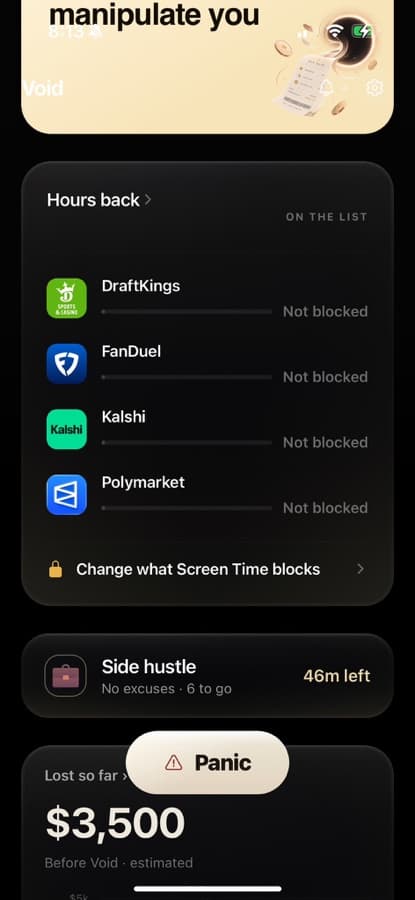
Option 1: Screen Time on its own
This is the manual route. It works, it costs nothing, and it is where Void's blocking ultimately runs too. Its weak spot is that you set it up and you know the passcode, so it tends to come down in exactly the moment it was for.
- Open Settings, tap Screen Time, and turn it on if it is off.
- Tap App Limits, then Add Limit. Pick the betting apps: DraftKings, FanDuel, BetMGM, Caesars, Kalshi, Polymarket, whatever is on your phone. Set the limit to one minute and make sure Block at End of Limit is on.
- Go back to Screen Time and tap Content & Privacy Restrictions. Under Content Restrictions → Web Content, choose Limit Adult Websites and add every sportsbook and casino site you use under Never Allow. Note that Apple's adult filter switches on with it.
- In the same restrictions screen, find the App Store purchases section and set Installing Apps to Don't Allow. That stops a deleted sportsbook app from being reinstalled in thirty seconds.
- Set a Screen Time passcode and have someone you trust choose it so you do not know it. This is the step most people skip, and it is the one that matters.
Apple's own instructions are at support.apple.com. The limits of this route: the site list is only as long as you make it, a new app is not on the list until you add it, and there is nothing for the minute the urge hits.
Option 2: Void on top of Screen Time
Void asks iOS for Screen Time access and does the blocking through it, so the lock is Apple's. What Void adds is the setup, the site catalog, the strictness levels and the urge tools. The steps:
- Download Void on the App Store and answer the setup questions. What you bet on, how often and how much becomes the baseline for your Money Saved estimate.
- On the blocking screen, tap Change what Screen Time blocks. iOS asks whether Void may use Screen Time; allow it. Apple's picker opens, and you tick the betting apps. Void receives opaque tokens, not app names, so it never knows what you chose.
- Add the betting sites you actually use, up to ten. Void fills the rest of Screen Time's 49 website slots with the major US sportsbooks, casinos and sweeps brands, so the filter holds your sites and the big ones.
- Optionally install the site block. iOS shows one prompt to add a VPN configuration. It is not a VPN in the usual sense: it carries nothing but DNS lookups, stays on your phone, and answers more than 340,000 gambling domains with “no such site” in every browser and every app.
- Pick a strictness. Standard opens a 15-minute access window on request, three a week, every one logged. Delay puts a 10-minute wait in front of that window. Locked has no access from inside the app at all.
What exactly gets blocked
- Apps you chose. Blocked through Apple's Screen Time shield, around the clock. There is no schedule to edit and no off-hours: the scheduled-blocks feature was removed on purpose, because every window had a gap.
- Up to 49 websites in Screen Time's filter. Your own sites (up to ten) plus a curated list of major betting brands. Apple caps this list, which is why the second layer exists.
- 340,000+ domains in the optional site block. Built from The Blocklist Project's public gambling list plus a curated set, 342,897 domains as of September 2026, resolved on your phone. Works in Safari, Chrome, in-app browsers and the sportsbook apps themselves.
What it does not cover, said plainly: a site reached by raw IP address, a browser that runs its own encrypted DNS, an app you did not select, and any other device you own. Void's own lists are gambling only; bank apps, brokerages and crypto exchanges are never blocked unless you add them yourself. One side effect to know about: Apple only allows a custom website filter together with its own adult-site filter, so Void exempts the largest adult sites and a smaller one may still be stopped by iOS rather than by Void.
What you can turn off or remove
Void is a commitment device, not a parental control, and it is not designed to be impossible to remove. Here is every way out, so there are no surprises:
- Lower strictness or switch blocking off in Void's Settings. Every lowering starts a 10-minute wait, then you confirm. The wait is the whole feature: most urges do not survive it.
- Revoke Screen Time access in iPhone Settings → Screen Time, under the apps that have Screen Time access. The app shields come down immediately.
- Remove the site block in Settings → General → VPN & Device Management, where it appears as “Void — betting site block”.
- Delete the app. Everything comes off with it. If you had Void installed and switched blocking off, Void sends a reminder to turn it back on; it never nags more than that.
Make the block hold
Blocking removes the two-tap path. It does not remove the reasons you were tapping. Three things make it hold:
- Self-exclude with the books themselves. Every licensed sportsbook has a self-exclusion option in its Responsible Gaming settings, and most states run a list that covers every operator at once. The steps are on the quit sports betting page.
- Cut the money off. Delete saved cards from the apps before you block them, and ask your bank whether it can decline gambling transactions.
- Plan for the urge. A blocked app does not stop the wanting. What to do in that minute is on the gambling urges page.
Common questions
- Does Void block on a schedule?
- No. Blocking is always on. There are no schedules, no game-night windows and no off-hours, because every gap in a schedule is where a bettor goes. What you choose is the strictness: how hard it is to open a blocked app for a few minutes.
- Can Void see which apps I block?
- No. You pick apps in Apple's own picker, and iOS hands Void opaque tokens instead of names. The tokens never leave your phone. Void's blocked screen is not even told which app it just stopped.
- Can I still get into a blocked app?
- On Standard, yes: a 15-minute window opens right away, three a week, and every one is logged. On Delay, the same window comes after a 10-minute wait. On Locked, there is no access from inside the app at all. Raising strictness is instant; lowering it takes a 10-minute wait.
- How do I turn it off or delete Void?
- Inside the app, switching blocking off goes through the same 10-minute wait as any lowering. Outside the app, iOS lets you revoke Void's Screen Time access in Settings, remove the site block under VPN & Device Management, or delete the app, which removes everything at once. Nothing in Void can stop you; Apple does not allow it.
- Does the site block send my browsing to Void?
- No. The site block is a DNS filter that runs on your phone. A gambling domain is answered 'no such site' on the spot; every other lookup goes to a public resolver. It reads nothing, logs no domain, and has no connection to Void's servers. The only thing it writes is a count of blocked lookups, so Settings can show how often it stood.
- Does it work on Android?
- Void is an iPhone app today. An Android version is in progress and not yet on Google Play.
Void is on the App Store
Made for iPhone. Blocking runs through Apple's Screen Time on your own phone; Void never sees which apps you choose.
Void Pro is $9.99 a month or $59.99 a year, with a 7-day free trial on the annual plan. Billed by Apple; cancel any time in your iPhone's Settings.
Read next
If you need help right now
Free, confidential, and open 24/7. You don't have to be in crisis to use any of these.
- Call 1-800-MY-RESETNational Problem Gambling Helpline · 1-800-697-3738
- Text the helpline1-800-697-3738 or 1-800-522-4700 — no call needed
- Chat with a counsellorIn your browser, 24/7
- Call or text 988Suicide & Crisis Lifeline
- Text HOME to 741741Crisis Text Line
These are independent organisations. Void receives nothing for listing them and never shares your information with them.